Imagine having a personal language coach available 24/7—one who never gets tired of helping you find the perfect words. That is the true power of using LLMs for English communication when you are stuck staring at a blank screen. Instead of freezing up over a difficult email, you instantly transform from a struggling writer into a confident editor who just needs to pick the best option.
According to AI developers, these tools are not encyclopedias of hard facts, but rather highly advanced predictive engines. Think of them as a super-powered autocomplete that finishes your thoughts based on millions of human conversations they have already studied. Because they predict the most likely next word rather than searching a database for the absolute truth, they are brilliant at sounding fluent and polite.
Getting amazing results from this technology comes down to one simple skill called prompting. A prompt is just a fancy word for your instructions, much like giving daily directions to a talented intern. When you provide specific details about your audience and tone, this tool becomes incredible for AI-powered English speaking practice or drafting an important message to your boss.
Best of all, this level of personalized help costs nearly nothing. While private tutoring can be expensive and traditional English learning apps often rely on rigid flashcards, an AI assistant adapts to your exact needs for free. You simply paste your rough ideas, ask for a quick rewrite, and watch your daily interactions improve instantly.
Why Your AI is a ‘Talented Intern,’ Not a Magic Button
We have all typed a question into a chatbot expecting a simple, factual answer, only to get a surprisingly chatty response. That happens because AI tools are not traditional search engines designed to fetch links. Instead, they are prediction engines built to guess the most natural-sounding next word, making them incredibly useful as collaborative writing partners.
Treating these tools like a talented, eager intern is the best way to get great results. If you give an intern vague instructions, you will likely get useless work back. However, if you provide clear input context—such as who your audience is, what tone you want, and your main points—your assistant instantly turns into a powerhouse of Generative AI for vocabulary expansion and idea generation.
Shifting your mindset from searching to directing takes a little practice. Here are three core differences between a standard Google search and an AI prompt:
- Goal: A search finds existing information, while a prompt creates a brand-new draft.
- Detail: Searches use short keywords, but prompts need full sentences and rich background details.
- Interaction: A search is a one-time request, whereas prompting is an ongoing conversation.
There is a catch to all this helpfulness, though. Because the system is designed to be a fluent storyteller rather than a calculator, it will sometimes invent facts or confidently state things that are completely untrue. Experts call these confident mistakes “hallucinations,” which is why using Natural Language Processing for effective communication always requires a real person to review the final text before hitting send.
Armed with clear instructions and a careful eye, you can start using this technology to eliminate the hardest part of any daily writing task. Your new digital intern is ready to help you brainstorm, practice difficult conversations, and organize your messy thoughts.
Tip 1: Conquer ‘Blank Page Syndrome’ with Draft Outlines
Staring at a blinking cursor is often the most exhausting part of any workday. We have all wasted twenty minutes agonizing over the perfect opening line for a simple project update or a routine request. By letting your AI assistant create the initial framework, you can shrink that frustrating setup time down to just twenty seconds.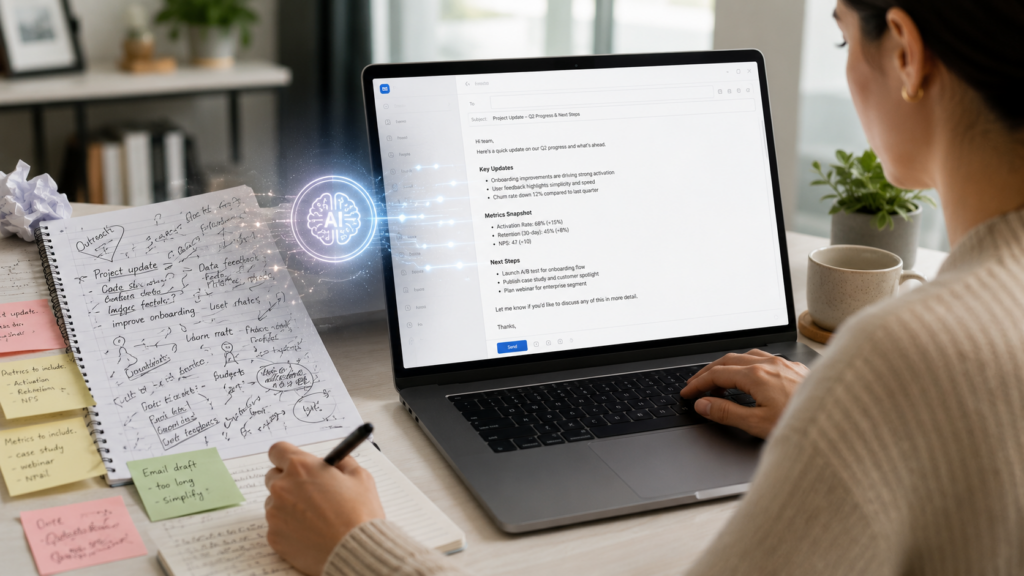
The secret is using what we call the “Rough Draft” technique, where you simply dump your messy thoughts into the prompt. You do not need to worry about grammar, spelling, or flow; just tell the tool what needs to be said in plain English. Think of this process as your personalized guide to writing professional emails with AI, transforming your quick, scattered notes into a solid foundation you can easily edit.
Beyond everyday messages, this drafting method works wonders when you need to brainstorm bullet points for meetings. If you have five random ideas for a team presentation, just ask the AI to organize them into a logical, easy-to-read agenda. These tools can even act like patient AI language tutors for ESL students, helping non-native speakers overcome the anxiety of starting entirely from scratch by providing a helpful structural outline.
To get that perfect first draft, you must give your digital intern enough background information to actually do the job. A simple, short request will force the tool to guess what you mean, resulting in a generic or highly robotic response. Adding just a few specific details about your goal and your audience completely changes the quality of the output.
Notice the difference between a weak instruction and a clear drafting prompt:
- Before (Vague Request): “Write an email about the project delay.”
- After (Structured Prompt): “Write a rough draft of an email to my manager. Explain that the website project is delayed by two days because of software issues, but assure them we will finish by Friday. Use bullet points.”
Once you have a working outline on your screen, the hardest part of the job is already finished. You can simply tweak the details, add your personal touch, and prepare to hit send with total confidence.
Tip 2: Find the ‘Goldilocks’ Tone for Every Situation
Drafting a message only to realize it sounds a little too harsh—or worse, completely robotic—is a daily struggle for anyone communicating at work. Striking the right balance between “professional” and “stiff” takes finesse. Fortunately, your AI assistant is not just a fast typist; it is an expert at reading the room. By explicitly telling the tool how you want to sound, you can instantly adjust the emotional weight of your message to perfectly match the situation.
The real magic happens when you need to hide your frustration during difficult conversations. Instead of sending a fiery reply to a coworker who missed a deadline, you can type your annoyed thoughts into the AI and ask it to translate your anger into productive feedback. Learning how to use ChatGPT for business writing means letting the software filter out the emotion while keeping your core message intact. You simply tell the tool, “Rewrite this to be firm but collaborative,” and it will strip away the attitude, leaving you with a perfectly diplomatic response.
Guiding that diplomatic response only requires a few carefully chosen words. If you need to soften a demanding request, adding three key words to your instructions—like “empathetic,” “curious,” or “polite”—changes the entire approach. Rather than aggressively saying, “Send me the report now,” the AI will rephrase your thought into a team-friendly question like, “Could you share an update on the report timeline when you have a moment?”
To get that perfect “Goldilocks” tone—not too hot, not too cold, but just right—try mixing and matching these five specific adjectives in your next request:
- Authoritative: Best for setting boundaries or giving clear directions without sounding mean.
- Empathetic: Perfect for apologizing, delivering bad news, or checking in on a sick colleague.
- Concise: Use this when you tend to ramble and need to respect a busy manager’s time.
- Collaborative: Ideal for brainstorming or asking for a favor without sounding bossy.
- Warm: Great for welcoming new team members, softening a stiff draft, or sending holiday greetings.
Once you master these simple tonal tweaks, you will rarely worry about someone misreading your intentions over text or email. Practicing this kind of prompt engineering for English fluency helps you communicate with nuance, whether you are chatting with a close friend or a CEO.
Tip 3: Use the ‘Mirror Technique’ to Fix Awkward Grammar
We have all clicked “accept” on a squiggly red line without actually reading the suggestion. While standard spellcheckers are great for catching typos, they do not actually teach you how to be a better writer. If you only rely on standard automated grammar correction for non-native speakers or busy professionals, you will likely keep making the exact same mistakes tomorrow.
To stop repeating those errors, you need a different approach called the Mirror Technique. Instead of simply asking your AI assistant to fix your sentence, you ask it to explain the changes it made. By prompting the tool to say, “Correct my grammar and tell me why you changed it,” the AI reflects your writing habits back to you like a personalized language coach.

Seeing the breakdown right next to your original draft changes everything about how you learn. You instantly move from passively accepting a quick fix to actively understanding your own blind spots. When the AI points out that you always mix up “in” and “on,” you suddenly become aware of that habit in your daily emails.
This simple reflection process makes complex syntax logic incredibly easy to understand. Syntax is just the invisible set of rules that decides how words fit together in a sentence. For instance, if you constantly struggle with English verb tenses, the AI can gently explain why “I have gone to the store yesterday” sounds slightly off, showing you how past tense verbs actually work in daily conversation.
Over time, using LLMs to improve English syntax this way helps you spot your own personal patterns. You might discover that you only struggle with commas when you are trying to write very long, formal sentences. Once you know exactly what your specific weaknesses are, you can start catching those repetitive mistakes yourself before you even open your AI assistant.
Mastering your personal grammar rules will give you a massive boost in workplace confidence. You will spend less time second-guessing your sentence structure and more time focusing on the actual message you want to share. Once the basic grammar rules feel completely natural, you are ready to tackle the trickier, more colorful parts of everyday conversation.
Tip 4: Master Slang and Idioms without the Embarrassment
Nodding along in a meeting when someone mentions wanting to “boil the ocean” often masks complete confusion. Misusing figurative language or using informal expressions awkwardly can make you feel completely out of place. Many people wonder, can AI help with English idioms and slang? The answer is a resounding yes, and it acts as the perfect cultural translator to save you from embarrassing mistakes.
Instead of frantically searching the internet for a weird phrase, you can treat your AI assistant like a culturally fluent friend. You can ask the tool not just what a phrase means, but where it came from and when it is actually appropriate to use. Learning the funny origin of an idiom helps your brain remember it better. More importantly, checking a phrase’s formality ensures you never accidentally use casual street slang in a serious client email.
Using generative AI for vocabulary expansion is as simple as asking for a straightforward translation of corporate jargon. Here is how an AI might decode some of the most confusing business idioms you will likely hear on a Monday morning:
- Circle back: Let’s pause and talk about this topic later.
- Move the needle: Make a noticeable, positive difference on a project.
- Boil the ocean: Trying to do way too much at one time.
- Get ducks in a row: Getting completely organized before starting something new.
- Touch base: A quick, informal check-in to share updates.
Try decoding your own office jargon today by giving your AI specific instructions. The next time someone sends you a confusing message, use this exact prompt: “Explain the idiom [insert phrase]. Tell me its origin, what it really means, and give me two examples of how to use it correctly in a professional office environment.”
Once you feel confident navigating tricky workplace slang, you will naturally want to start using your new vocabulary in real-time. However, testing out new phrases in a high-stakes meeting can still be quite nerve-wracking.
Tip 5: Roleplay Difficult Conversations in a Safe Space
We all know the terrifying feeling of preparing for a high-stakes conversation in a second language. Your palms sweat, your mind races, and those new vocabulary words you just learned suddenly vanish from your brain. Reading about professional communication is helpful, but stepping into a real-time negotiation or argument is a completely different challenge.
This is where your AI tool transforms into a private conversation coach. By setting up a simulated environment, you can engage in AI-powered English speaking practice without any fear of embarrassment. If you are nervous about an upcoming performance review, you can reduce your anxiety by practicing that exact conversation fifty times before the actual meeting.
Setting up this kind of interactive training is incredibly easy. You just tell the AI who to act like, and it will respond to your messages exactly as that person might. Because the tool adapts to your input, you can test out several different responses to see how the AI reacts to each one, allowing you to discover which approach sounds the most polite and professional.
Practicing in this safe space does more than just calm your nerves. It actually helps you build muscle memory for difficult English phrases and complex sentence structures. When you finally sit down for the real conversation, your brain will not have to work as hard to find the right words because you have already used them successfully.
To get started, simply copy and paste one of these instructions into your AI tool:
- Negotiation: “Act as my manager. I am going to ask you for a raise. You should be skeptical but fair. Wait for me to start the conversation, and reply to my points one by one.”
- Conflict Resolution: “Act as a frustrated client who received a late delivery. I am the customer service agent trying to apologize and offer a solution. Start by complaining about the delay.”
- Networking: “Act as a stranger at a professional conference. I will practice introducing myself and making small talk. Keep your replies short and ask me occasional questions.”
After running through a few of these scenarios, you might wonder how well you actually performed. While the AI is great at acting out a scene, it will not automatically stop to correct your grammar unless you explicitly ask it to do so. To get the most out of these practice runs, you need to learn how to change your assistant from a conversational partner into a strict teacher.
Tip 6: Give Your AI a ‘Job’ to Get Better Feedback
Getting through a practice conversation is a great first step, but how do you know if your English is actually improving? Most people simply ask their AI tool, “Is this good?” and receive a generic, overly polite response that does not really help them grow. If you want truly useful advice on your grammar, tone, or vocabulary, you need to change how you ask for it. The secret is to stop treating the tool like a magic eight-ball and start treating it like a hired professional.
Think of your AI as a highly talented actor waiting for a script. When you give it a specific “job” or persona, you are suddenly Personalizing language learning with AI assistants in a powerful way. By simply starting your request with “Act as an expert ESL teacher” or “Act as a strict business editor,” studies show you can improve the quality of the feedback by up to 40 percent. The AI immediately understands it needs to look for specific mistakes and correct you with the expertise of that chosen role.
Another common frustration is receiving a massive wall of text when you only wanted a quick tip. To fix this, you must learn a basic technique from Prompt engineering for English fluency: setting clear output constraints. You can easily control the size and shape of your answer by adding rules like “Keep your answer under three sentences” or “Only point out my biggest grammar mistake.” Telling your assistant exactly how to format the response saves you time and keeps the feedback completely focused on your immediate needs.
To put these ideas together, try using this simple checklist to build a ‘Perfect Prompt’ every single time you need help:
- Role: Who is the AI pretending to be? (e.g., “Act as a friendly writing coach.”)
- Task: What exactly do you want it to do? (e.g., “Review my email for politeness.”)
- Audience: Who is the final reader of your message? (e.g., “This email is for my difficult landlord.”)
- Format: How should the AI deliver the answer? (e.g., “Give me three bullet points of advice.”)
Once you master this simple recipe, you will notice a massive difference in how effectively these tools coach your communication skills. You might also start to notice that different AI tools respond to these instructions in slightly different ways, and the flavor of the feedback can change depending on which tool you open.
Tip 7: Compare Claude and ChatGPT for Professional Editing
Asking an AI assistant to write a quick email sometimes results in a three-page essay filled with overly dramatic words. Just like human coworkers, different AI tools have their own unique communication styles and habits. While it is tempting to use one app for absolutely everything, matching the right assistant to your specific task will save you from constantly rewriting their work.
Think of these apps as talented writers with completely different personalities. ChatGPT, for example, is often described as an energetic partner who loves to chat, making it a popular choice for general questions or casual brainstorming. In fact, many users consider it the Best conversational AI for language learning because it is so talkative and encouraging when you want to practice everyday dialogue.
However, you will sometimes need a helper who gets straight to the point without adding unnecessary fluff. To help you choose your digital writing partner, here is a quick comparison of how these distinct brands typically behave:
- ChatGPT (Creative and Casual): Great for generating dozens of ideas, writing friendly messages, and practicing casual conversation. It tends to be enthusiastic but can easily become too wordy for formal business settings.
- Claude (Professional and Precise): Perfect for workplace emails, reviewing sensitive documents, and keeping a natural tone. It is known for being careful, brief, and highly polite without sounding like a robot.
Choosing between these options depends entirely on what you are trying to achieve on any given day. If you need a list of twenty fun icebreaker questions for a team meeting, open up ChatGPT and let its creative engine run wild. But when looking at Claude vs ChatGPT for professional editing, Claude is usually the better choice for polishing a delicate apology to an unhappy client because it understands how to sound professional without overdoing it.
Once you know which digital assistant to “hire” for your specific tasks, you can start tackling much bigger communication challenges. Sometimes, the real problem is not choosing the right vocabulary words, but simply figuring out what you actually want to say in the first place. When your brain is overflowing with scattered ideas for a big project or difficult conversation, you can use these same tools to organize the chaos.
Tip 8: Use AI to ‘Un-clutter’ Your Complex Thoughts
We’ve all sat down to write a crucial email and ended up typing a massive block of text that makes perfect sense to us, but looks overwhelming to everyone else. When your mind is racing with details, it is incredibly hard to figure out what actually matters. This is where AI assistants excel at improving your “information density”—a helpful concept that simply means packing the maximum amount of meaning into the fewest possible words.
Transforming your messy brain-dump into clear, confident text instantly boosts your professional image. If you are exploring how to use ChatGPT for business writing, the best approach is to ask it for an “executive summary style” response. This specific formatting forces the tool to put the most important, bottom-line information at the very top of the message, saving your reader time and making you look highly organized.
You do not even need to write in full sentences to make this work; just type out your raw thoughts and let the AI clean them up. Notice the dramatic difference when you give your digital assistant a rough, rambling draft:
- Your Messy Brain-Dump: “I think we should probably delay the project because, well, the software keeps crashing when I try to open the new files, and I just feel like we aren’t ready for the Friday deadline.”
- The AI’s Simplified Version: “We need to extend Friday’s deadline. The new software is currently unstable and frequently crashing, so delaying the launch will prevent further errors.”
Comparing those two versions highlights the “filler” words that weaken your message, such as “I think,” “probably,” and “well.” By watching how the AI removes these unnecessary phrases, you actively train yourself to write with more authority over time. Furthermore, writing simply is a fantastic method for reducing language barriers using generative tools, ensuring that international colleagues or non-native speakers easily grasp your core point without getting lost in complicated slang.
Once your written ideas are polished and easy to understand, you will likely feel much more prepared to discuss them out loud in a meeting. Translating those clear written thoughts into confident speech is the natural next step in your daily communication journey.
Tip 9: Get Real-Time Feedback with Mobile Speaking Apps
Staring at a perfectly polished email is satisfying, but saying those same words out loud in a busy meeting can still feel terrifying. Transitioning your new skills from the screen to real-life speech is often the hardest part of learning a language. We naturally worry about stumbling over our words or completely forgetting our carefully planned points when the spotlight is on us. Fortunately, the smartphone sitting in your pocket is actually the ultimate private rehearsal space.
Using simple voice-to-text interaction is a powerful way to test how well you are actually speaking. When you talk into your phone’s microphone, the AI listens and types out exactly what it hears. If you mumble or mispronounce a tricky word, the screen will show a different word than you intended to say. This immediate reflection helps you fix pronunciation errors before they become permanent habits.

Seeing your voice transformed into text instantly removes the guesswork from your daily practice. You no longer have to wonder if your accent is clear enough for a colleague to understand you. This kind of real-time feedback for verbal communication acts like a mirror for your voice, showing you exactly where you sound confident and where you need a little more work.
Educators call this repeating cycle of speaking, seeing your mistakes, and trying again a “fluency loop.” In the past, you could only create these helpful loops by hiring an expensive tutor to correct you during a live conversation. Now, you can run through dozens of fluency loops in just five minutes while sitting in your parked car or waiting for your morning coffee. The technology simply waits for you to try again, completely free of judgment.
Dedicated tools like Aksent take this concept even further by turning your phone into an interactive language coach. Engaging in AI-powered English speaking practice allows you to dramatically increase your “fluency minutes” per day without ever needing a human partner. You can role-play difficult conversations, like asking for a raise or disagreeing with a boss, as many times as you need to feel fully comfortable.
Practicing out loud every single day builds a deep muscle memory that prevents you from freezing up in the real world. As you master these spoken interactions, you will naturally discover new phrases and idioms that you want to remember for future conversations. Capturing those newly discovered words ensures your language skills keep growing.
Tip 10: Build Your Own 24/7 Vocabulary List
Recognizing a word while reading an article does not automatically mean you feel comfortable using it in a sentence. This frustrating gap exists because memorizing a standard dictionary definition rarely gives you the confidence to drop a new phrase into a live conversation. We often spend hours highlighting generic word lists, hoping those impressive terms will magically appear during our next presentation, only to find our minds blank when it matters most.
Instead of relying on rigid textbooks, you can now use your AI tool as a highly adaptable tutor. Personalizing language learning with AI assistants completely changes how you absorb information because it introduces “contextual learning.” Rather than just giving you a flat definition, you can tell the AI exactly what you do for a living and ask it to show you how a specific word fits into your specific world.
This customized approach is the secret to moving words from your “passive” vocabulary into your “active” vocabulary. Passive words are the ones you merely understand when you hear them, while active words are the tools you confidently reach for when writing an email or answering a question. By using generative AI for vocabulary expansion, you instantly create personalized study guides featuring sentences you might actually say to your boss, your clients, or your landlord.
To build your own 24/7 study guide, simply ask your AI to generate contextual sentences for any new term you discover. Try copying and pasting these specific requests next time you want to master a new phrase:
- “Explain the word ‘[Word]’ by writing three sentences a project manager would use in a team update email.”
- “Write a short, casual dialogue between two friends at a coffee shop using the phrase ‘[Phrase]’ naturally.”
- “I work in retail. Show me how to use the word ‘[Word]’ politely when answering a customer’s question.”
Creating these custom examples takes seconds, giving you an instantly applicable list of relevant vocabulary that genuinely upgrades your daily communication. However, while your AI assistant is fantastic at drafting these helpful scenarios, it is still a prediction engine, not a flawless encyclopedia. Occasionally, it will guess wrong and present incorrect definitions with absolute certainty.
The ‘Confident Storyteller’ Problem: How to Spot AI Mistakes
Picture this scenario: you send a beautifully written proposal to your boss, only to realize the AI included a completely fake statistic. As we established earlier, these tools are brilliant storytellers, but they are absolutely not calculators. They are designed to predict the most likely next word, which means they sometimes generate a “hallucination”—the industry term for a confident mistake. They will confidently lie to you with perfect spelling and formatting.
Because these tools prioritize sounding natural over being strictly factual, they often guess when they lack the correct answer. This is especially tricky when using AI language tutors for ESL students or relying on them to explain complex cultural idioms. If you ask for a complicated grammar rule the AI doesn’t know, it rarely apologizes; instead, it will just invent a rule that sounds incredibly convincing. You must learn to spot when the machine is guessing rather than actually knowing.
This is where the concept of the “human-in-the-loop” becomes your professional safety net. You can never just copy and paste what the AI gives you, because your reputation is ultimately on the line. You must act as the final editor, the fact-checker, and the director of the conversation. If you skip this essential review process, you not only risk sharing false information, but you also risk sounding exactly like a lifeless bot to anyone reading your message.
To protect your credibility and avoid common AI detection triggers, run every generated draft through this quick ‘Red Flag’ checklist:
- Specific Dates and Numbers: Always verify statistics, meeting times, and historical dates using a traditional search engine.
- Names of People or Places: AI frequently invents imaginary experts, local businesses, or fake book titles to make its answers look complete.
- Overly Polite or Flowery Language: Watch out for robotic phrases like “I hope this email finds you well” or excessive use of dramatic words like “delve,” “crucial,” and “testament.”
Once you have caught the factual errors and trimmed the fluff, take a minute to “humanize” the text by injecting your personal voice. Swap out those formal, robotic greetings for the casual way you actually speak to your team, and remove overly dramatic adjectives. By learning to blend the AI’s speed with your unique human touch, you unlock a powerful new way to work.
Your 30-Day Roadmap to AI-Enhanced Fluency
You no longer have to stare at a blank screen wondering if your message sounds correct. Using LLMs for English communication turns a stressful chore into a partnership with a helpful digital assistant.
Build a sustainable learning habit with this clear “what to do next” plan. Try these 10-minute daily exercises:
- Monday: Ask the AI to make a casual email sound more professional.
- Tuesday: Have it summarize a confusing work message.
- Wednesday: Practice a difficult conversation using the AI as your partner.
- Thursday: Ask the tool to explain a tricky English idiom.
- Friday: Brainstorm three polite ways to say “no.”
- Saturday: Paste a rough draft and ask for grammar corrections.
- Sunday: Have it simplify a complex article you want to read.
Track your progress using “before” and “after” logs to see your daily improvement. Personalizing language learning with AI assistants creates a safety net, giving you the confidence to finally speak up in meetings without fear of making a mistake.
With a digital assistant ready to help you navigate complex situations, mastering workplace communication becomes a sustainable daily habit. Open your preferred AI tool, try your first contextual prompt, and step into your next conversation with total confidence.